How to Protect Your Screen From Shoulder Surfers
Privacy filters, seating position, device settings and active detection each cover a different angle — and research shows people notice a shoulder surfer only about 7% of the time. Here is how the defences compare, and which combination closes the gaps.
To protect your screen from shoulder surfers, you can employ several defences: a privacy filter, intentional seating, protective device settings, and active monitoring which alerts you to threats when someone looks at your screen. But what makes each one useful on its own, and is the best protection simply to combine several at once?
What is shoulder surfing?
Shoulder surfing is when someone secretly watches your screen or keypad for information such as passwords, PINs, or other sensitive data. It is a no-tech attack that relies on physical proximity, rather than traditional software hacking.
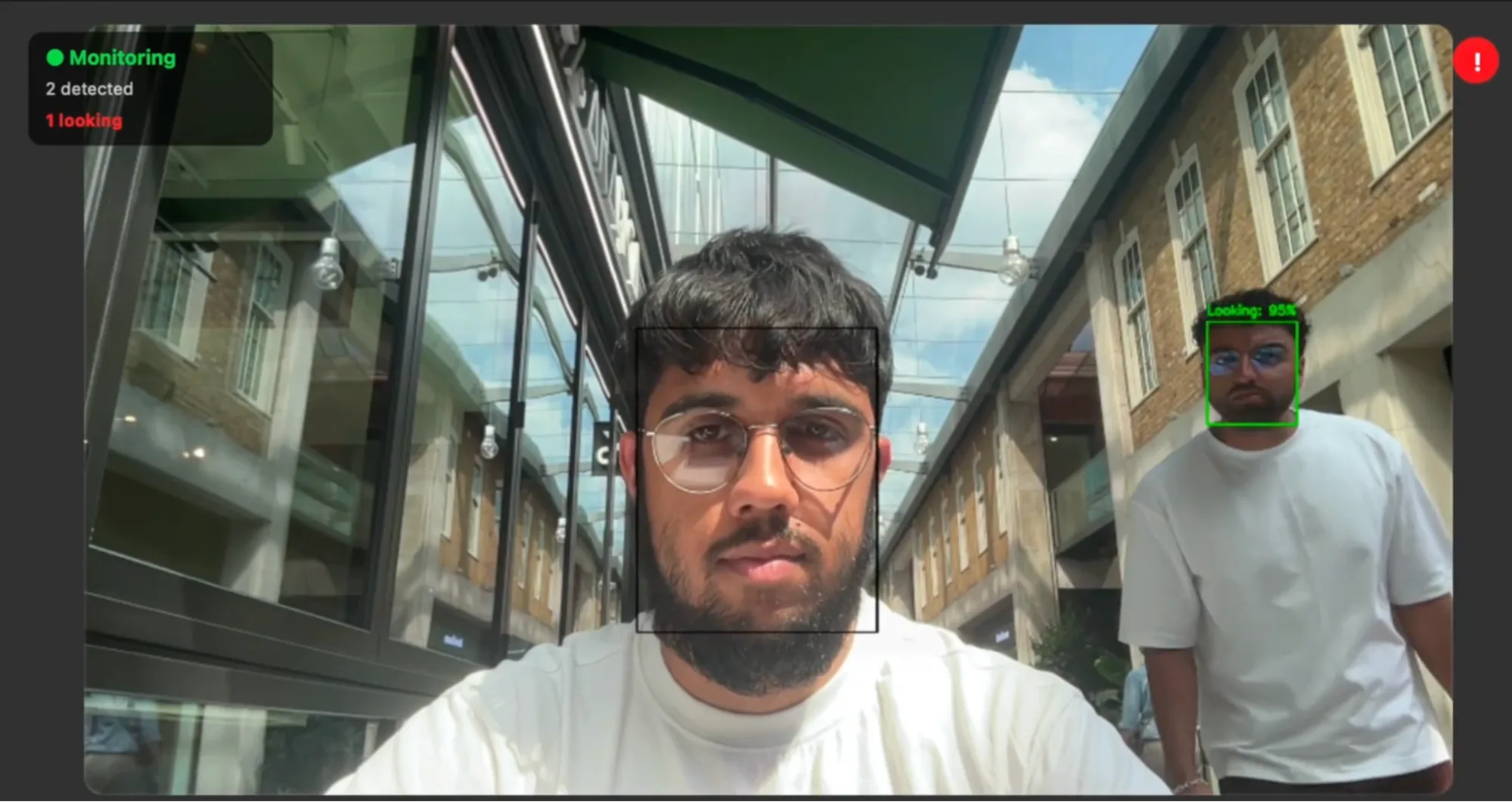
How common is it?
More common than you think, especially given you have no record of when someone looks at your screen. In a 2017 LMU Munich study of 174 people, 67.4% recalled a shoulder surfing incident that took place on public transport, and observers were spotted by the person they watched in only about 7% of cases (6 of 84 observers) [1]. Smartphones featured in 89.7% of incidents; laptops in just 4% [1]. An NYU survey of 267 people (Roy, Halevi and Memon, 2015) found 73% had seen someone else enter a PIN [2]. A separate field experiment by the Ponemon Institute (sponsored by privacy-filter maker 3M; worth considering with that in mind) found visual hacking succeeded in 91% of 157 trials, and that staff never challenged the tester in 68% of attempts [3].
That 7% figure is the heart of the problem. The same LMU paper argues that protection should not depend on the user starting it, because people simply do not realise they are being watched [1].
Does where you sit actually help?
Yes. Sitting with your back to a wall leaves fewer angles for a snooper to exploit. It’s free, instant, and effective even against someone directly behind you. However, you have to find this position every time, which is never guaranteed. In addition, no controlled study has measured how much such a habit actually helps towards preventing shoulder surfing.
Do privacy filters stop shoulder surfing?
A privacy filter is a louvred overlay that blacks out your display for anyone off to the side. Kensington rates its filters to a plus or minus 30-degree viewing angle, so “those outside of it will just see a dark or blurred display” [5]; 3M markets the same as a 60-degree black-out [4]. They are passive, need no power, and strong against side-on viewers. However, they do not block someone directly behind you, they dim your screen, and they can be damaged.
Which device settings reduce your exposure?
Lowering brightness, enabling auto-lock, and pairing a password manager with biometrics all shrink what a snooper can capture. These features are usually built-in and mostly free, with biometrics meaning there is no password to watch you type. However, a timer relies on you setting it, and no solid research shows dimming alone defeats a determined onlooker.
Can an app detect shoulder surfing?
Yes. EyesOff is a Mac and Windows app that uses your webcam and on-device AI to spot when another face looks at your screen. It works against viewers within your webcam’s view, including someone reading over your shoulder, and it can alert you or blur the screen, with all processing staying on-device. However, it draws from the battery to actively monitor the webcam, and is naturally limited by the field-of-view of your laptop webcam.
Comparison of methods
Here is how the main options compare on the two things that matter most: (1) whether they stop someone directly behind you, and (2) whether they only work if you remember to engage them.
| Method | How it works | Blocks someone directly behind you? | Needs you to engage it? |
|---|---|---|---|
| Privacy filter | Micro-louvre film limits the view to 30 degrees; an onlooker on the side sees only a dark screen | No | Only to fit or attach it |
| Seating position | You face a wall so no one can sit behind you | Yes | Yes, every time |
| Brightness and auto-lock | A dimmer screen and quick lock reduce exposure | No | Yes, to set them up |
| Password manager plus biometrics | Fills logins so nobody watches you type | Yes, for passwords | No, one-time set up |
| Active detection (EyesOff) | On-device AI alerts you and/or blurs the screen when it detects a shoulder surfer | Yes | No |
Do you need both a privacy screen and EyesOff?
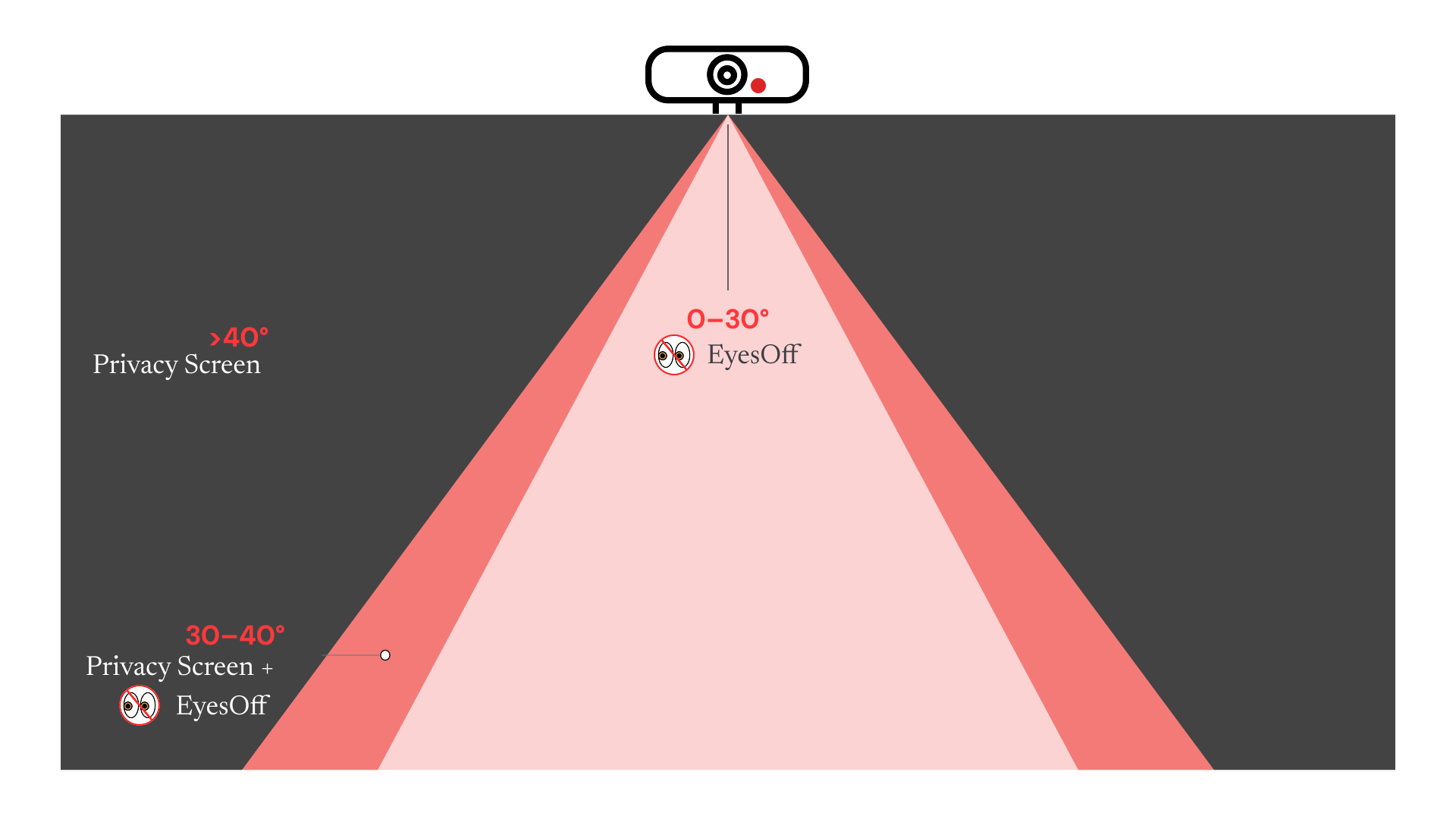
Privacy screens and EyesOff mostly protect you from different angles, so together they leave fewer gaps. A filter starts blacking out from around 30 degrees and is fully dark by about 40, so it handles the snooper to your side. But it leaves the area directly behind you (between 0 and 30 degrees) exposed, which is the clear viewing angle and exactly where someone reads over your shoulder. EyesOff covers you in that area, though it is limited by the field-of-view of the laptop’s webcam, which is usually around 40 degrees.
Which approach should you choose?
Match the method to your threat.
If you handle sensitive work and cannot control who sits behind you, a filter leaves the over-the-shoulder angle open. Add biometrics so there is no password to watch, and cover that blind spot with active detection like EyesOff, which alerts you or blurs the screen. The research shows you rarely notice a watcher yourself, so that is the one layer that does not depend on you.
No single method covers every angle, which is why the research points towards layering. Pick the two or three that fit how you actually work, and make sure at least one of them does not depend on you noticing.
FAQ
Do privacy screens actually work?
Yes, against side-on viewers: makers like 3M and Kensington rate them to a 30-degree viewing angle, so anyone outside it sees a dark or blurred display [4][5]. However, they do not stop someone reading over your shoulder from directly behind.
Is there an app that warns you when someone is looking at your screen?
Yes. EyesOff is a Mac and Windows app that uses your webcam and on-device AI to actively detect when someone looks at your screen, alerting you or blurring the screen, within your webcam’s field of view.
Is shoulder surfing illegal?
Simply looking is generally not a crime, but using what you see for fraud or unauthorised access is illegal under laws such as the UK Computer Misuse Act 1990 and US identity-theft statutes [6].
Sources
- Eiband, M., Khamis, M., von Zezschwitz, E., Hussmann, H., & Alt, F. (2017). Understanding Shoulder Surfing in the Wild: Stories from Users and Observers. Proceedings of CHI 2017. medien.ifi.lmu.de
- Roy, A., Halevi, T., & Memon, N. (2015). An HMM-based Multi-sensor Approach for Continuous Mobile Authentication. MILCOM 2015 (IEEE). arxiv.org
- Ponemon Institute (2016). Global Visual Hacking Experimental Study: Analysis. Sponsored by 3M. multimedia.3m.com
- 3M. Privacy filter product specification (60-degree black-out). 3m.com
- Kensington. Working Securely in Public with Privacy Screen Filters (2025). kensington.com
- UK Computer Misuse Act 1990 (legislation.gov.uk); US identity-theft statutes, 18 U.S.C. § 1028 / § 1028A.